
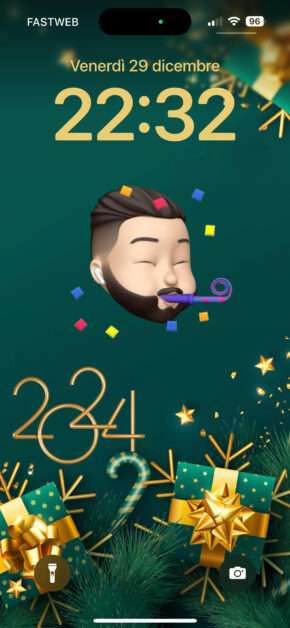
Download New Year Memoji Wallpaper 2024 – Custom wallpaper with your own Memoji

Your download will start in

Get the Wallpapers Central App
This wallpaper is available for free through our app for iPhone and Android.


Description
Hit "Download" for detailed instructions on customizing this wallpaper with your Memoji.
How to Customize Your Wallpaper with Your Memoji:
[app id="915249334" nome="Shortcuts"][/app]
- Ensure that the "Shortcuts" app is installed on your iPhone. Download the "New Year Wallpaper 2024" shortcut.
- If a pop-up error appears with the message "New Year Wallpaper 2024 cannot be opened," follow the instructions here to resolve the issue.
- Download another shortcut, SCLibrary, which facilitates updates and fixes.
[app img="https://wallpapers.ispazio.net/wp-content/uploads/2022/12/ispazio-104.jpg" nome="New Year Wallpaper 2024" prezzo="by iSpazio" link="https://wallpapers.ispazio.net/?down_id=1876763&down_url=https://www.icloud.com/shortcuts/3d1cc14708df447dacc32a659d3dd0b0?time=1703886575"]GET[/app]
[app img="https://wallpapers.ispazio.net/wp-content/uploads/2021/12/sc.png" nome="SCLibrary" prezzo="by iSpazio" link="https://www.icloud.com/shortcuts/3307668c98b94bddaa380e32fd452ec7"]GET[/app]
- Now, let's create the wallpaper. Open the Notes app, create a new note, and use the Emoji Keyboard to select a Memoji sticker with your face. The sticker will appear in the note. Press on the Memoji then hit the share button.
[screenshot img1="https://wallpapers.ispazio.net/wp-content/uploads/2022/12/IMG_7987.jpg" img2="https://wallpapers.ispazio.net/wp-content/uploads/2022/12/IMG_7988.jpg" img3="https://wallpapers.ispazio.net/wp-content/uploads/2022/12/IMG_7990.jpg" img4="https://wallpapers.ispazio.net/wp-content/uploads/2022/12/IMG_7994.jpg" img5="https://wallpapers.ispazio.net/wp-content/uploads/2022/12/IMG_7995.jpg"][/screenshot]
- Scroll down the sharing menu and select "New Year Wallpaper 2024." You may encounter 2 or more pop-ups requesting your permissions. Always tap on "Allow."
- The final Christmas Wallpaper featuring your Memoji will be automatically created and saved in your camera roll. Use this image to wish your friends a Merry Christmas via WhatsApp, Instagram, or any other platform, or set it as your Lockscreen background. Enjoy!
If you create a video tutorial about this process, please tag @ispazio on Instagram or TikTok. We will be glad to share it with the world!
Wallpaper Preview on iPhone
Preview automatically generated with an internal Wallpapers Central system. The time on the Lockscreen can be adjusted in both height and color, offering a better final result than this simple preview.
Follow @ispazio on Instagram so you don't miss the weekly "Weekly Wallpapers" series where we suggest the best wallpapers to download for free.



Categories with Similar Wallpapers
You can find other similar wallpapers by browsing the categories
Be the first to comment on this wallpaper
Sign in to leave a comment: